Module 1: Fundamentals
By the end of this module, you will understand what agentic engineering is. You will also understand the four concepts that every agentic workflow works on: context, tools, memory, and permissions.
- 1.1What Is Agentic Engineering?
- 1.2How an Agent Loop Works
- 1.3Understand Context Engineering By Understanding What Agents Can See
- 1.4What Are Tools And What Do They Enable Your Agent To Do
- 1.5Memory for Agents: Session, Project, and Persistent Memory
- 1.6Permissions & Sandboxing: What Agents Are Allowed to Do
What Is Agentic Engineering?
Code execution is the defining capability that makes agentic engineering possible.
“Without the ability to directly run the code, anything output by an LLM is of limited value. With code execution, these agents can start iterating towards software that demonstrably works.”
Simon describes agentic engineering as software development with the assistance of coding agents.
Coding agents are agents that can both write and execute code. Popular examples include Claude Code, OpenAI Codex, and Gemini CLI.
This guide uses Claude Code as its base example, because it is the concrete tool that you will build with. Every principle in this module applies to other models and tools too.
For LLMs like GPT-5, Gemini, and Claude, agents run tools in a loop to reach a goal. This is the working definition.
An agent is software that calls an LLM with your prompt. It also passes the LLM a set of tool definitions. The agent then calls any tool that the LLM requests. It sends the results back to the LLM.
For coding agents, those tools include one that executes code. You prompt the coding agent with a goal. The agent then generates and executes code in a loop, until it meets that goal.
The Human’s Job in Agentic Engineering
We now have software that writes working code. So what is left for us humans to do? “So much stuff”, says Simon.
Code is not the only work of a software engineer. It never was.
The craft has always been the decision about what code to write. Any software problem has dozens of possible solutions. Each solution has its own tradeoffs. Your job is to navigate those options and to find the ones that fit the circumstances best.
We must give our coding agents the tools that they need to solve our problems. We must specify those problems at the right level of detail. We must then verify the results and iterate on them. We stop when we are confident that the results address the problems in a robust and credible way.
LLMs do not learn from their past mistakes. Coding agents can. To make this happen, we must update our instructions and our tool harnesses with what we learn.
Use coding agents well, and they help you take on much more ambitious projects. Agentic engineering helps us produce more code, of better quality, that solves more important problems.
How an Agent Loop Works
“Claude often operates in a specific feedback loop: Gather context → take action → verify work → repeat. This offers a useful way to think about any agent, coding or otherwise, and the capabilities it should be given.”
To make the loop concrete, Shihipar builds a hypothetical email agent. The example shows what each step involves.
- Gather context. An agent needs more than a prompt. It must fetch its own context while it works. That context can be files, logs, or documents that relate to the task. The file system makes this possible, together with any tool that searches the file system.
- Take action. When the agent has context, it acts on that context. Tools are the primary building block. A tool can edit a file, run a script, or call an external service through an MCP server. Tools let an agent do something. Without them, an agent can only describe what it would do.
- Verify. The final step is evaluation. An agent that checks and improves its own output is more reliable. It catches mistakes before they compound. It corrects itself when it drifts. It improves as it iterates. Verification can come from a rule, a visual comparison, or another model that judges the result.
Every agent passes through this loop.
The cycle is simple and mechanical. The agent receives a prompt, calls tools, and gets the results back. It repeats these steps until the task is complete.
Understand Context Engineering by Understanding What the Agent Can See
Context is the set of tokens that you include when you sample from a model. Context engineering is the set of strategies that curate and maintain the best set of those tokens during inference. Context holds everything that arrives there beyond the prompt itself.
Anthropic’s team says that this practice determines what an agent gets right or wrong.
Context engineering is the natural progression of prompt engineering.
With prompt engineering, you write and organize the instructions for a single turn.
Context engineering is broader. It covers the entire state that the model can reach at any point. That state includes system instructions, tools, external data, and message history. You must manage this state continuously, not write it once.
An agent that runs in a loop generates more data with every turn. Some of that data could be relevant to its next turn. You must refine all of it, again and again, into what the agent keeps.
Why Context Is Finite
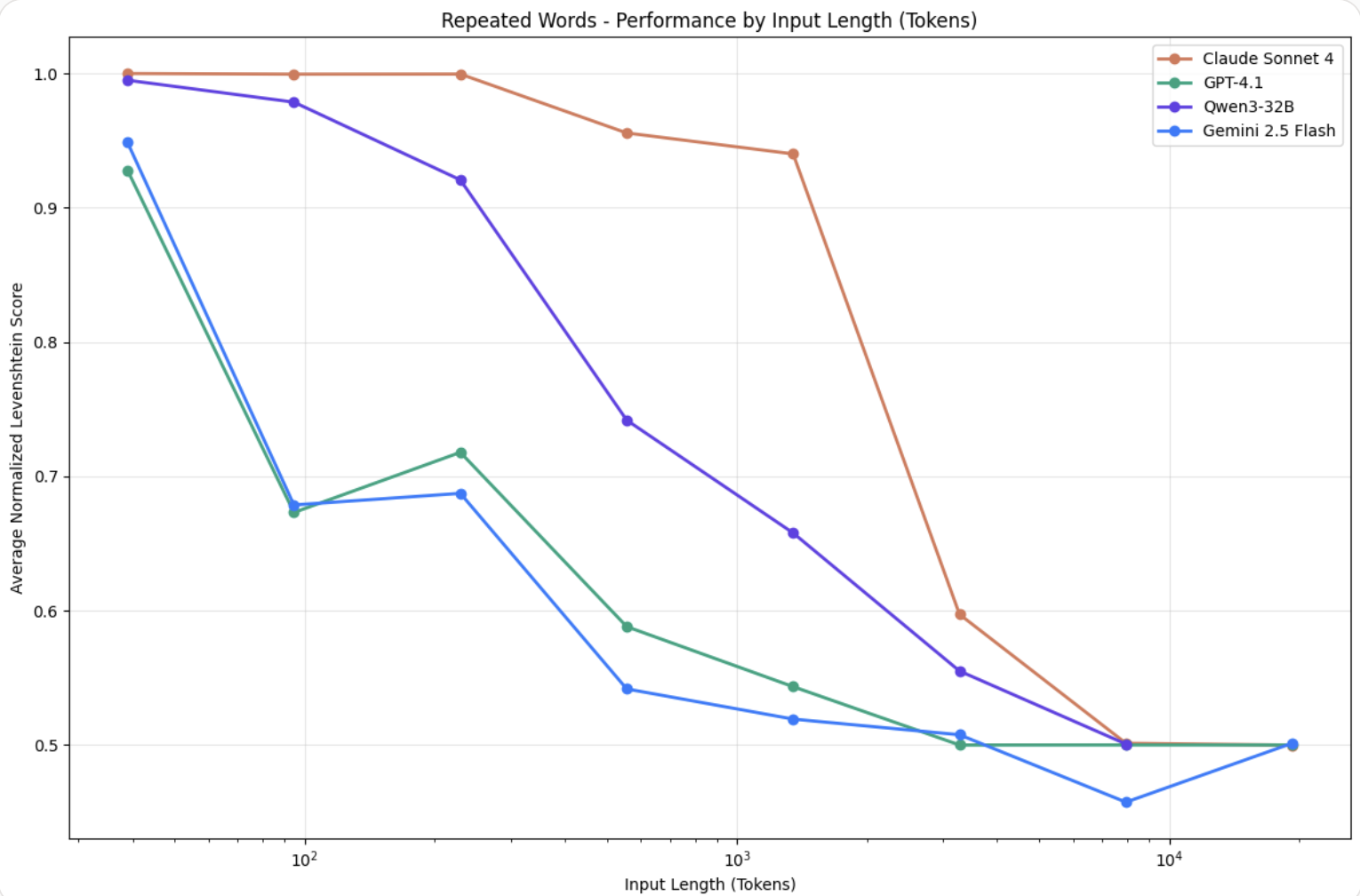
A model can take in a large amount of data. Even so, Anthropic observed that LLMs lose focus past a certain point, as humans do. Research on needle-in-a-haystack benchmarking gave us the concept of context rot. As the number of tokens in the context window goes up, the model recalls information from that context less accurately.
Some models degrade more gracefully than others. The pattern holds across all of them. You must treat context as a finite resource with diminishing marginal returns. Anthropic describes this resource as an attention budget. A model draws on that budget when it parses context. Every new token depletes the budget by some amount.
This scarcity traces back to how transformers work.
Every token can attend to every other token across the full context. For n tokens, this produces n² pairwise relationships. As the context grows longer, a model captures all of those relationships less well.
The Guiding Principle To Help You Manage Context
The attention budget is finite. Anthropic therefore recommends one approach. Good context engineering finds the smallest set of high-signal tokens that gives you the best chance of the outcome you want.
This single idea covers all that you need to manage context. It tells you how to structure a system prompt. It tells you when a tool must pull in new information. It also tells you how an agent must manage a task that runs longer than one context window can hold.
What Are Tools And What Do They Enable Your Agent To Do
A tool lets an agent reach outside the conversation and do something. A tool can read a file, run a command, search a codebase, or call an API.
“Agents are only as effective as the tools we give them.”
Traditional software is deterministic.
A function like getWeather("NYC") fetches the weather in New York City. It does this the same way every time you call it. Tools for agents break that contract. From the same start conditions, an agent can call a tool. It can also answer from what it already knows, or ask a question first. Sometimes it will misuse a tool. Sometimes it will not understand how to use the tool at all.
So you cannot design tools for agents the way you design software for other developers or systems.
Anthropic says, “instead of writing tools and MCP servers the way we’d write functions and APIs for other developers or systems, we need to design them for agents.”
The goal is to widen the range of situations where an agent can act effectively. The tools that work best for agents are usually the tools that a person finds most intuitive.
The Code: Your daily unfair advantage in software engineering.
Join 350,000+ software engineers, tech leads, and CTOs who start their morning with The Code.
Memory for Agents: Session, Project, and Persistent Memory
By default, an agent does not remember anything once a session ends.
Each Claude Code session begins with a fresh context window.
The session closes, and everything from that conversation goes away. This includes the files that the agent read, and the mistakes that it made and corrected. Anthropic calls this session memory. Session memory exists only for the length of one conversation.
An agent starts from zero in every new session. To improve across sessions, it needs a place to keep what it learns outside that one conversation.
Anthropic calls this just-in-time context retrieval. The alternative is to load everything relevant up front. An agent records what it learns in memory files, then reads those files back on demand.
This keeps the active context on the current task. The agent does not try to hold everything at once. This is the same attention budget problem as before.
Claude Code implements two mechanisms that carry knowledge past a single session. They map onto two different kinds of memory:
- Project memory, through
CLAUDE.mdfiles. A person writes these instructions: coding standards, architecture notes, and common workflows. They persist because they are files under version control. The agent itself remembers nothing. - Persistent memory, through auto memory. Claude writes these notes for itself: build commands that it discovered, debugging insights, and patterns and preferences that it noticed. Claude saves a note when that note would help in a future conversation. Claude reads its own notes back at the start of later sessions.
Both load at the start of the session. CLAUDE.md also lets you control what Claude remembers. It helps Claude navigate with tools, and it helps Claude maintain your standards and frameworks.
Permissions & Sandboxing: What Agents Are Allowed to Do
Your problem: an agent that can edit files and run commands can also do damage. The cause can be a genuine mistake or a prompt injection attack.
According to Anthropic, this much access to your codebase and your files can introduce risks. The risk is highest with prompt injection.
The answer to that risk is a permission model. Claude Code is read-only by default. It asks for approval before it modifies a file or runs most commands.
This protects the user, but it has a cost. You must click approve again and again. This slows down development cycles, and it can lead to approval fatigue. With approval fatigue, users do not read what they approve. Development then becomes less safe.
A system that asks permission for everything can become less safe, not more. This happens when people no longer read the prompts.
Sandboxing as the Alternative
Sandboxing does not ask permission for every action. Instead, it sets pre-defined boundaries, and the agent works freely inside them. Anthropic’s approach uses two boundaries together:
- Filesystem isolation. The agent can access or modify only specific directories. A prompt-injected agent cannot touch sensitive system files.
- Network isolation. The agent can connect only to approved servers. A prompt-injected agent cannot leak information or download malware.
Anthropic says, “without network isolation, a compromised agent could exfiltrate sensitive files like SSH keys; without filesystem isolation, a compromised agent could easily escape the sandbox and gain network access.”
If you isolate only one boundary, the other stays wide open.
Sandboxing and permission prompts do not compete. When you define the boundary well, the agent works autonomously inside it. You get fewer interruptions and more real safety than a request for approval at every step.
By this point you should have:
- A working definition of agentic engineering, and what makes coding agents possible.
- A clear picture of the loop that every agent runs: gather context, take action, verify work.
- The reasons why context is finite, and what makes context engineering effective.
- The reasons why tools for agents need a different design from software for other developers.
- A clear picture of how agents carry knowledge across sessions, through project memory and persistent memory.
- The reasons why permission prompts alone are not enough, and how sandboxing balances autonomy with safety.
Module 2: Getting Started With Your First Agent
Module 2 puts these concepts to work. You will use Claude Code directly, and you will build your first agent from scratch.